
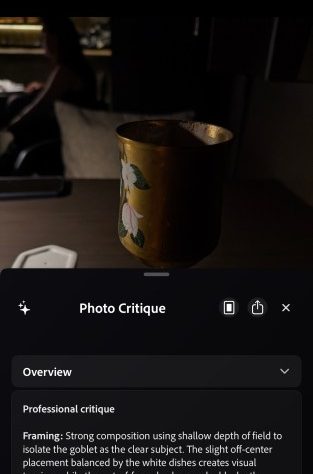
Adobe is introducing fresh AI-driven functionalities to its beta iOS camera application known as Project Indigo, which debuted last year. The app originally provided professional controls, multi-frame super-resolution, and various capture modes, but is now enhancing its offerings with features that leverage LLMs (large language models) to evaluate photographs and suggest edits.
It is also incorporating additional AI capabilities, including sophisticated object removal, depth of field creation, and the option to apply varying styles to images.
Marc Levoy, the lead on Adobe’s project, had previously improved the photography technology for Pixel devices. He noted that many generative AI tools rely on prompt-based editing, and often, crafting the ideal prompt to alter a photo or achieve the desired outcome can be quite challenging. This is why many of the new experimental AI features consist of buttons designed to yield more consistent results.
For example, Google’s camera coaching feature for Pixel devices, which was released last year, provided more basic framing tips. In contrast, the functionalities of Project Indigo are quite detailed and could assist you in picking up some photography techniques, even if you do not fully agree with the AI’s evaluation.
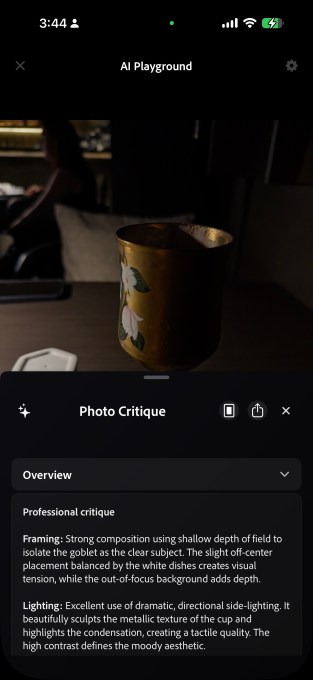
Two features fall under this category. The first is the photo critique, which provides a “professional” assessment regarding composition, lighting, colors, and emotional resonance.
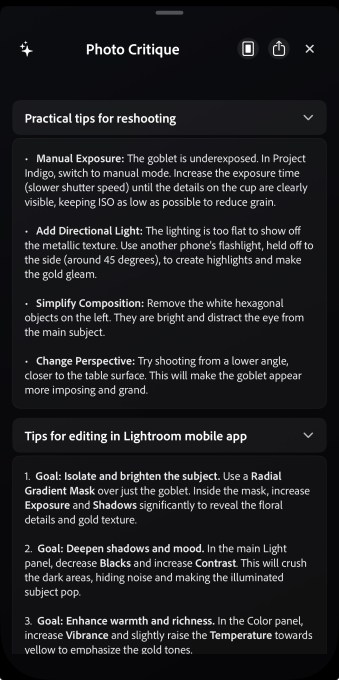
The second feature offers capture and edit suggestions, providing guidance on reshooting the photo by advising changes to composition, exposure, and objects in the frame. For example, the app recommended I eliminate a hexagonal white object that appeared in a photo I took.
Another section outlines how you can utilize an existing photo to enhance it using Adobe Lightroom controls.
Photography applications, such as Apple Photos, Google Photos, and Adobe Photoshop, have incorporated object removal capabilities for years. However, this feature generally requires users to circle or select an object by drawing on the display, which is not always foolproof.
Project Indigo’s newly introduced function offers toggles for elements to eliminate from an image, including background people, trash and bins, wires and poles, fences, vehicles, and other clutter. Users can also describe a custom object for removal. The outcomes of this feature are quite remarkable.
The app successfully removed my friend along with the item he was holding from the background without generating any odd artifacts.


The app also permits users to utilize AI for generating depth of field in a photograph, creating a simulated blurred background.
With this update, Adobe is also trialing a style transfer function that enables users to transform their images into various tones such as watercolor, pen and ink, ink line with color wash, monochromatic, and backlit subject. Some styles evoke memories of the early iterations of the Prisma app. With more advanced models, the outputs appear polished, though style transfer is not an innovative or particularly valuable addition.
Despite Levoy’s critique of the prompt-centric implementation, Project Indigo possesses a feature that allows users to articulate their edits. This can be employed to execute edit workflows that are absent in preset functionalities. However, this could lead to potential inconsistencies.
The company is deploying Google’s Gemini-based Nano Banana for these functionalities, while remaining open to integrating other models, including its proprietary Adobe Firefly model. These capabilities, gathered under the AI playground tab, remain in the trial phase, and only a limited user base will gain access to them. These features might never reach a broader audience, but it is encouraging to see enhancements that can educate users about the subtleties of photography, rather than merely generating more inconsistency.
When you purchase through links in our articles, we may earn a small commission. This doesn’t affect our editorial independence.